
Chain Two VPNs on Your Router and Nobody Sees the Whole Picture
A single VPN does less than its advertising suggests.
It hides your traffic from your ISP, which is the part everyone repeats. It does not hide you from the VPN provider. That provider sees your real address at one end and the sites you visit at the other. It can build the same map your ISP used to build, and if it keeps logs, sells them or gets subpoenaed, the map changes hands.
One box knows who you are. The other knows where you are going. The trick is to make sure they are not the same box.
Two hops instead of one
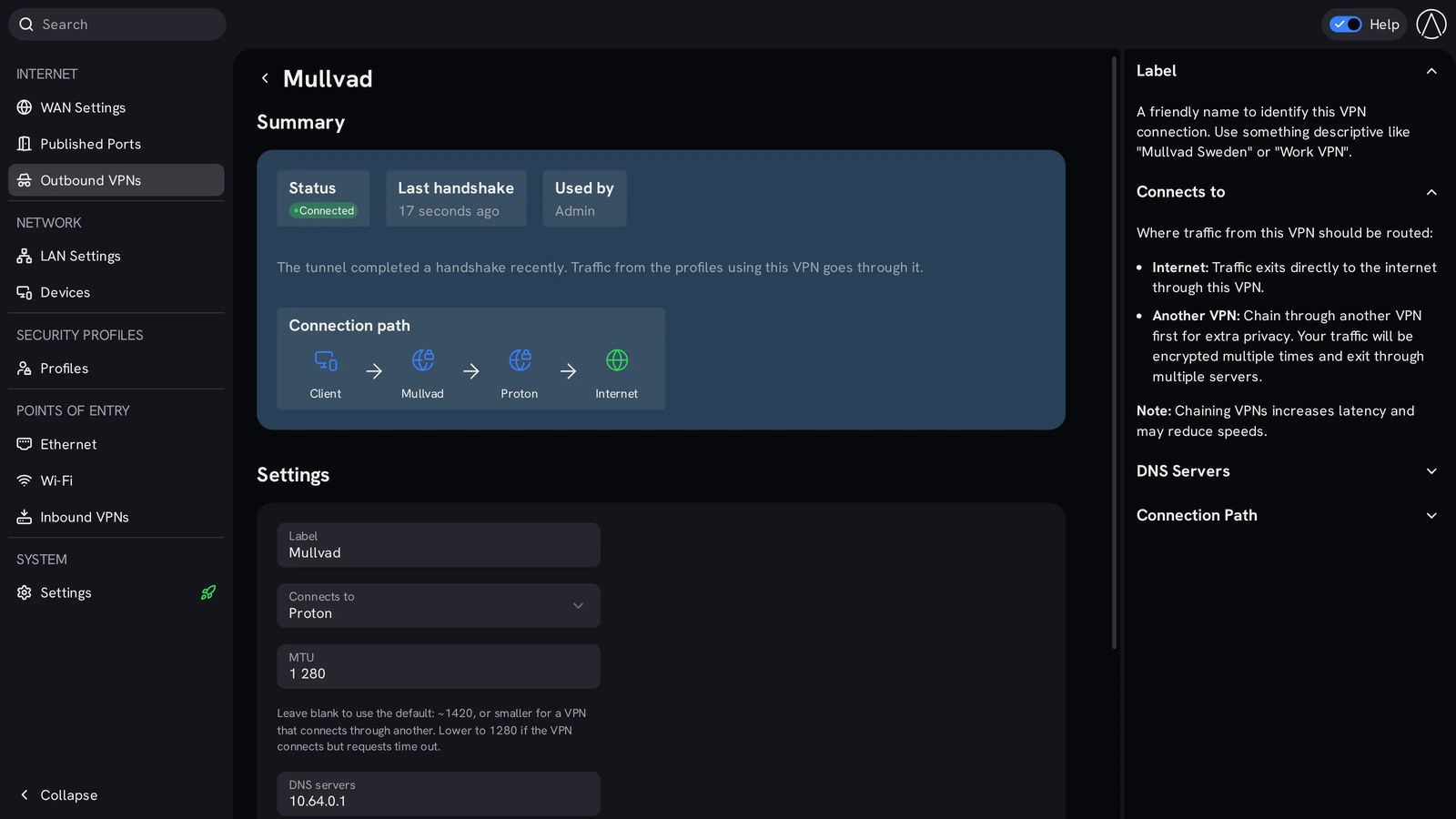
StartWRT, the router system on Start9’s RISC-V Router, lets you route any profile through one VPN provider, or chain two in sequence. The first provider sees who you are but not where you are going. The second sees where you are going but not who you are. Neither has the whole picture, and neither one alone is enough to reconstruct your life.
You pick it per profile, from a browser. The laptop can go through two hops while the television goes out direct, and the guest network goes through a third provider you do not use for anything else. No app on any device, no per-device client, no subscription installed on your phone.
When the tunnel drops, the traffic stops
This is the detail that separates a real setup from a screenshot of one. Cheap VPN configs leak: the tunnel dies and traffic quietly continues over your home connection in the clear, from your real address. StartWRT stops the profile’s traffic instead. Nothing leaks and nothing resumes until the tunnel is back.
Chain a second provider and the same discipline applies to both hops. The kill is not a checkbox buried in an app, it is how the profile is routed.
DNS is where most setups give it away
You can hide your traffic and hand over your entire browsing history in the first packet, because the lookup happens before the connection does. If your router forwards DNS to your ISP, the tunnel is decoration.
Each profile in StartWRT can resolve names through DNS servers of its own, over HTTPS, sent through the tunnel. The profile’s DNS choice travels with the profile. Your laptop talks to the resolver you chose, over the tunnel you chose, and your ISP sees an encrypted tunnel and nothing else.
Reaching home without exposing home
The same profile model works in the other direction. Each profile can run its own WireGuard server, so a device that connects from outside gets that profile and lands exactly as if it were in the house. Your phone gets the admin profile. A friend gets a shared services profile that can see the family server and nothing else.
You scan a QR code and you are in. No port forward to your desktop, no exposed admin panel, no third party in the middle holding the tunnel open.
Ports that expire on their own
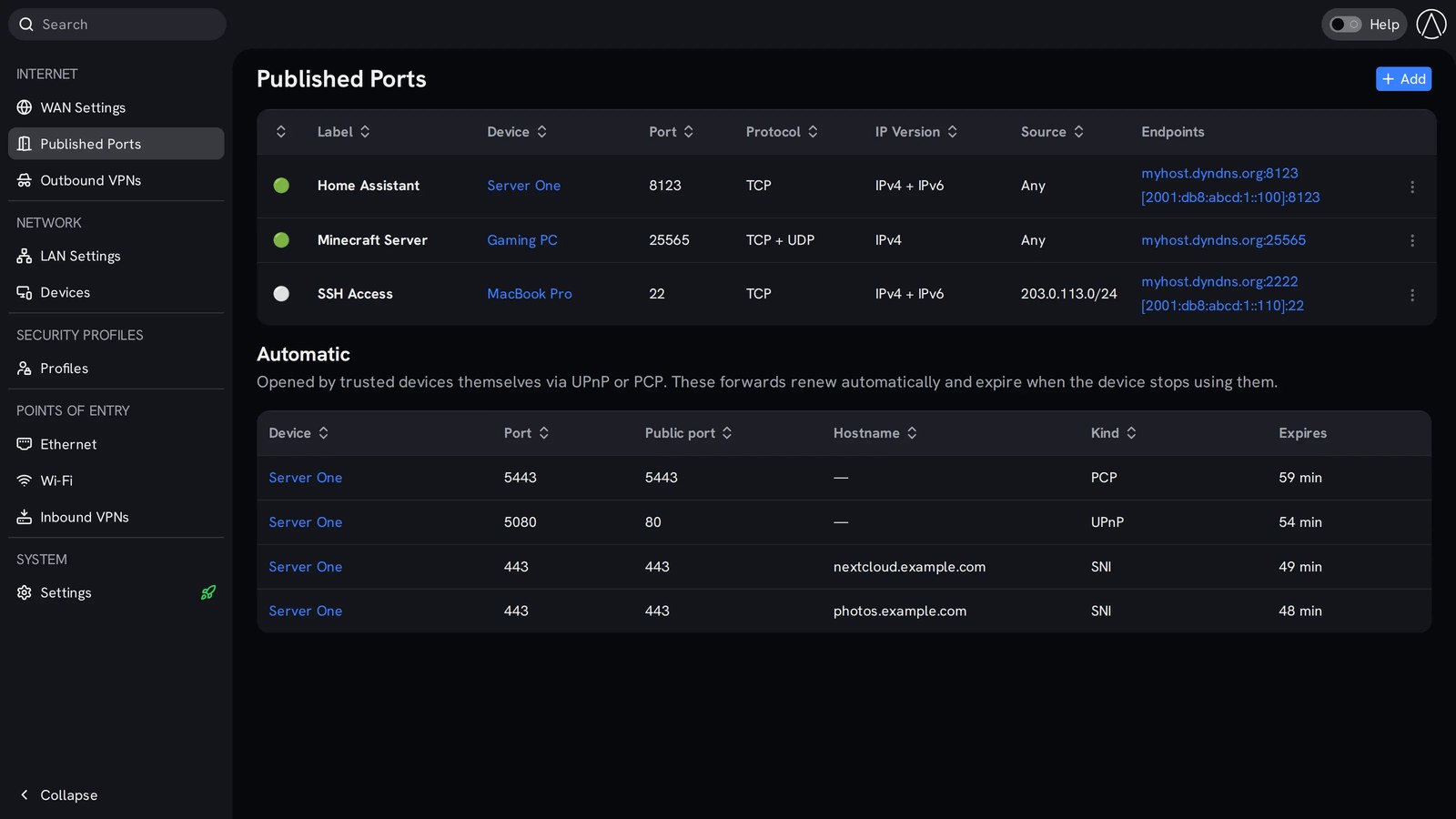
Inbound access is the other half of the privacy problem, because every port you forward is a door you have to remember to close. StartWRT has two kinds. You open a port yourself and control protocol, IP version, source and external port. Or you let a device you trust open its own port, and that permission expires unless the device renews it.
Several services can share port 443 by hostname, which means one door with a list of names on it instead of four doors standing open. When a device stops asking, the door closes itself.
What chaining does not do
It does not make you anonymous. If you log into the same account you always log into, the account is the identifier and no number of hops changes that. It does not defeat browser fingerprinting, and it does not help if the device in your pocket is signed into a profile with your real name on it.
What it does is narrower and more useful: it removes the single party that could otherwise see both ends of your connection. Your ISP stops being the map. Your VPN provider stops being the map. The two of them together cannot build the map, because neither one is holding both halves.
That is the honest claim, and it is worth more than the promises on the front of a VPN advert.
The cost of chaining
Two hops add latency, and that is arithmetic, not marketing. Browsing, downloads and streaming absorb it without complaint. Interactive work does not, which is why the setting is per profile: chain the profile that has to be private, leave the one that has to be fast, and stop pretending one setting fits every device.
Every part of the config is a standard OpenWrt file on the box. You can read it, back it up, move it to another router, or hand it to someone who knows more than you do. No account, no cloud dashboard, no vendor that disappears with your network settings.
The privacy you can verify
Most VPN products ask you to trust the provider that runs them. This one asks you to read the routing table. Your traffic leaves through two tunnels you configured, with DNS you chose, on a router whose software is MIT licensed, and it falls silent when a tunnel fails.
That is the difference between paying someone to hide you and owning the thing that hides you.
Get the router with the code
Start9 keeps a discount for readers of this site. Use the code below at checkout.
Coupon code: LOVEISBITCOIN
https://loveisbitcoin.com/start9
That link takes you to the Start9 page for readers here: the RISC-V Router, the Server One, StartOS, and the coupon applied.
Chain Two VPNs on Your Router and Nobody Sees the Whole Picture